Source: Claude Docs Agent Skills Overview 2026 04 17 (Anthropic platform docs — https://platform.claude.com/docs/en/agents-and-tools/agent-skills/overview.md)
The official reference page for Agent Skills — the authoritative doc on skill format, progressive-disclosure architecture, cross-surface support and limitations, and the security model. Complements the engineering blog Building Agents with Skills (narrative / philosophy) with the structural spec (VM environment, 3-level loading, field requirements, beta headers).
Visual overview — The Anatomy of a Claude Skill
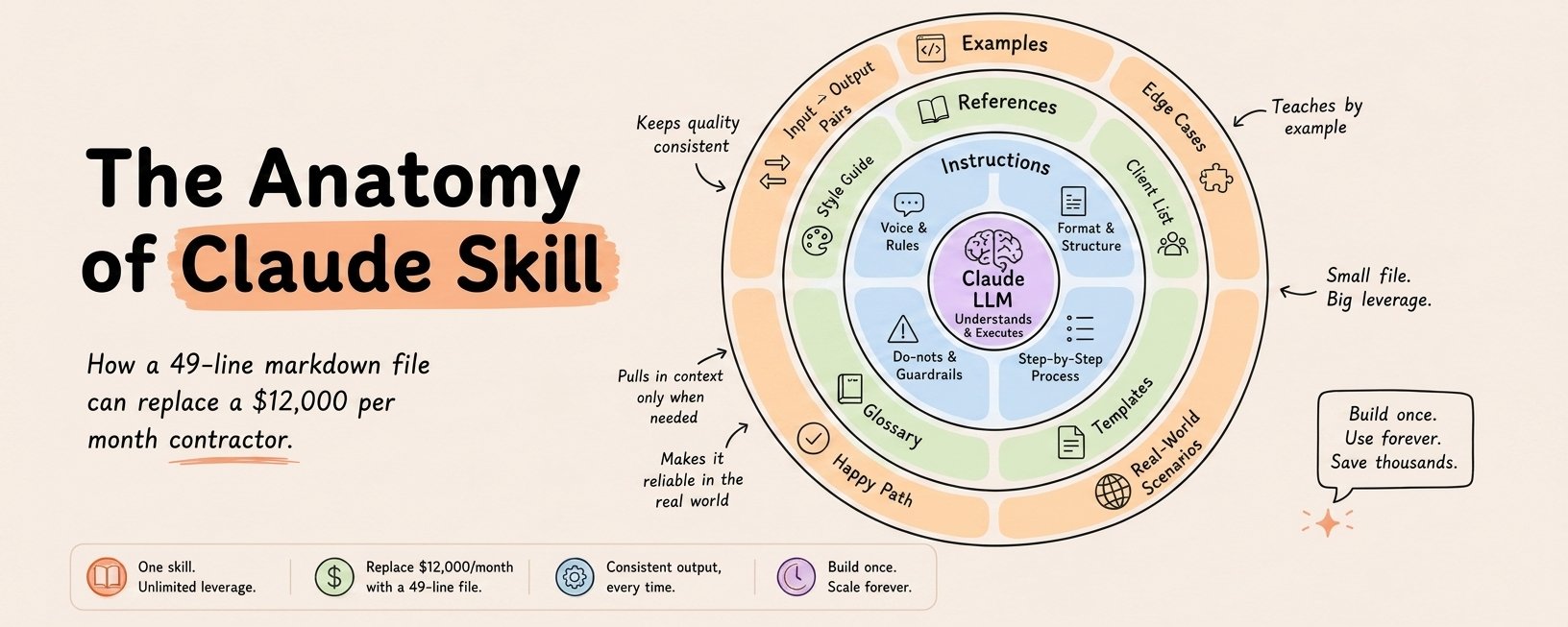
Community infographic visualizing Anthropic’s official three-level progressive-disclosure model as three concentric rings around a central “Claude LLM — Understands & Executes” core:
- Inner ring — Instructions (≈ Anthropic’s Level 2, SKILL.md body, <5k tokens, loaded when the skill triggers). Four quadrants: Voice & Rules, Format & Structure, Do-nots & Guardrails, Step-by-Step Process.
- Middle ring — References (≈ Anthropic’s Level 3+ structured resource files, loaded on demand via bash). Four examples: Style Guide, Client List, Glossary, Templates. “Pulls in context only when needed.”
- Outer ring — Examples (also Level 3+, but specifically the worked-pattern slice of the resource layer). Four examples: Input → Output Pairs, Edge Cases, Happy Path, Real-World Scenarios. “Teaches by example.”
The infographic’s load-bearing claim — “How a 49-line markdown file can replace a $12,000 per month contractor” — is a marketing framing, not Anthropic’s own pitch; the technical claim it visualizes (a SKILL.md + bundled references + worked examples gives Claude a reusable, progressively-loaded capability) maps directly to the Anthropic engineers’ four skill rules (rule 2: skills are more than prompts — 3-layer description + instructions + tools). Note: the Level 1 metadata layer (always-loaded name + description, ~100 tokens) isn’t shown in the infographic — useful as a teaching aid but not a complete map. Maps the four quadrants well but skips the invocation-control layer (user_invocable: false / disable_model_invocation: true) covered in the four-rule article and the skill_creator skill’s validation layer.
Key Takeaways
- Skills are filesystem-based, VM-executed. Claude runs in a virtual machine with filesystem, bash, and code execution. Skills are directories on that VM. Claude accesses them via bash — same way you’d navigate files on your machine.
- Three loading levels (Anthropic’s official numbers — slightly different from the earlier blog’s estimates):
- Level 1 (Metadata) — always loaded, ~100 tokens per Skill (just
name+descriptionfrom YAML) - Level 2 (Instructions) — loaded when Skill triggered, under 5k tokens (SKILL.md body)
- Level 3+ (Resources) — loaded as needed, effectively unlimited (bundled files executed via bash; code and contents don’t enter context)
- Level 1 (Metadata) — always loaded, ~100 tokens per Skill (just
- Scripts are token-free except for output. When Claude runs
validate_form.pyvia bash, the script’s code never loads into context. Only its output (e.g. “Validation passed”) consumes tokens. Makes scripts far more efficient than having Claude generate equivalent code on the fly. - YAML field requirements (formal spec):
name— max 64 chars, lowercase letters/numbers/hyphens only, no XML tags, cannot contain reserved words “anthropic” or “claude”description— non-empty, max 1024 chars, no XML tags
- Pre-built Agent Skills: PowerPoint (
pptx), Excel (xlsx), Word (docx), PDF (pdf). Available on Claude API and claude.ai. - API requires three beta headers to use Skills:
code-execution-2025-08-25skills-2025-10-02files-api-2025-04-14
- NOT ZDR-eligible. Agent Skills is explicitly excluded from Zero Data Retention arrangements. Skill definitions and execution data retained per Anthropic’s standard policy. Contrast with Extended Thinking which is ZDR-eligible.
- Custom Skills do NOT sync across surfaces. Claude.ai upload ≠ API upload ≠ Claude Code filesystem. Must manage separately on each surface where you want a skill available.
- Sharing scope differs by surface:
- Claude.ai — individual user only; no org-wide distribution or centralized admin management
- Claude API — workspace-wide
- Claude Code — personal (
~/.claude/skills/) or project-based (.claude/skills/); can be shared via Claude Code Plugins
- Runtime environment differs by surface:
- Claude.ai — varying network access per user/admin settings
- Claude API — NO network access, NO runtime package install, pre-configured deps only
- Claude Code — full network access (same as any program on user’s machine); global package install discouraged
- Security posture is explicit. Anthropic strongly recommends using Skills only from trusted sources. Malicious skills can direct Claude to misuse tools, leak data, or exfiltrate via external URL dependencies. “Treat like installing software.”
Progressive disclosure — quick reference
| Level | When loaded | Token cost | What |
|---|---|---|---|
| 1 | At startup (always) | ~100 tokens per Skill | name + description YAML |
| 2 | When Skill triggered | < 5k tokens | SKILL.md body |
| 3+ | As referenced | Effectively unlimited | Any bundled files — read via bash, scripts executed with output-only into context |
Minimal skill structure
pdf-skill/
├── SKILL.md              # Level 1 metadata + Level 2 body
├── FORMS.md              # Level 3, loaded only if form-filling needed
├── REFERENCE.md          # Level 3
└── scripts/
    └── fill_form.py      # Level 3, code never enters context
SKILL.md YAML frontmatter:
---
name: pdf-processing
description: Extract text and tables from PDF files, fill forms, merge documents. Use when working with PDF files or when the user mentions PDFs, forms, or document extraction.
---

# PDF Processing

## Quick start
Use pdfplumber to extract text from PDFs:
...
Cross-surface matrix
| Surface | Pre-built Skills | Custom Skills | Sync to other surfaces | Network | Central admin |
|---|---|---|---|---|---|
| Claude.ai | Yes | Yes (user-local, Pro+) | No | Varies by settings | No |
| Claude API | Yes | Yes (workspace-wide) | No | No | Workspace-level |
| Claude Code | No | Yes (filesystem) | No | Full | Via plugins |
API usage pattern
# (Pseudocode; actual usage requires the three beta headers)
response = client.messages.create(
    model="claude-sonnet-4-6",
    tools=[{"type": "code_execution_20250825"}],
    container={"skill_id": "pptx"},
    messages=[...]
)
Pre-built skill IDs: pptx, xlsx, etc. Custom skills uploaded via /v1/skills are shared workspace-wide.
Security checklist
Before using a third-party skill:
- Read every file in the skill folder — SKILL.md, reference files, scripts, bundled resources
- Look for external URL fetches — dependencies can change and become malicious
- Check what tools the skill expects (file ops, bash, code execution) and match against Claude’s current permissions
- Verify the skill’s stated purpose matches what its scripts actually do
- If you’re uncertain — don’t install. Treat like installing software from an unknown source.
Don’t install skills — author them (2026-08-05 addition)
Source: raw/I_Stopped_Installing_Claude_Skills._Here_s_What_I_Do_Instead..md — Nate B Jones, youtu.be/up0Bsf3f0Xc, transcript fetched 2026-08-05. Secondary/opinion; the argument is a reframe, not new mechanics.
The security checklist above covers what to check in a skill. This adds the argument for why installing third-party skills is the wrong default in the first place.
- A skill is not an app, and the app metaphor causes the mistake. An installed app carries a guarantee of behaviour; a skill carries someone else’s decisions — about the job, the tools, the acceptable shortcuts, and, most consequentially, what “done” means for them. Installing it imports that judgment along with the capability. The vivid framing: people “go on GitHub and randomly grab repos that have a bunch of promised skills and stick them in their AI as if they’re collecting Pokémon cards.”
- Two failure modes, not one. Untrusted source (you may be handing your agent malicious instructions — the supply-chain risk the checklist above addresses) and unknown interaction with the skills you already have and the task you actually want. The second is the one no security review catches.
- The load-bearing reframe: skills are written for agents to use and for humans to read. Both audiences are real and the field has been writing for a vague point between them. If a human can’t read it, you don’t know what’s in there; if the agent can’t use it, you get no power out of it. Every other decision in skill authoring follows from holding both.
- “An agent skill is like a note you leave for a worker who may not ask you a follow-up question before they go and get it done.” The best one-line statement of why skill ambiguity is more expensive than prompt ambiguity.
- Progressive disclosure is why this stays cheap. The runtime loads only the name and description up front; the full instruction body is read only when the skill is invoked or the description matches the task — so a large library costs little until used. (Consistent with the mechanics documented above; restated here because it is what makes “author many small skills” viable.)
- The recommended alternative is authorship, and voice is the on-ramp. Rather than installing, dictate what you want done — the argument being that your goals and definition of “done” are the unique input, and talking gets more of it out than typing. Then shape the transcript into a skill.
This is the skills-layer statement of the same principle as the CLAUDE.md primer’s hygiene guidance and the New Rules’ router pattern: context artifacts are cheap to accumulate and expensive to leave unexamined. Compare Open Skills — the same author’s proposal for a shareable-skill format, which this video’s trust argument is the natural counterweight to.
Two hard authoring constraints, and two new first-party skills (2026-08-19 addition)
From anthropics/skills commits captured on 2026-08-19.
Two constraints that will silently break a skill upload — both surfaced by a single rename commit (raw/anthropic-watch-skills-commit-0a64e398ec6bb34a494f0c347e8ccae53a862f8e.md), in which Anthropic renamed its own claude-academy-guide skill to academy-guide to comply:
- Skill names cannot contain the reserved words
claudeoranthropic(per the agent-skills best-practices documentation). Anthropic’s own skill violated this and had to be renamed — folder,SKILL.mdfrontmattername, and themarketplace.jsonentry and path all changed together. - The
SKILL.mdfrontmatterdescriptionhas a 1,024-character limit enforced by skill-upload validation. The same commit shortened a description from 1,176 to 992 characters to fit.
Both matter because they apply at upload time, not authoring time: a skill that works locally can fail to package. Check both before publishing.
Two new opt-in first-party skills:
academy-guide(raw/anthropic-watch-skills-commit-89dcaa3a283f79ed84fd8fe53e2208b9442a6427.md) — recommends matching Claude Academy (academy.claude.com) courses, tutorials, and use cases when a user asks how to use Claude. The design decision worth stealing: it reads the live catalog atacademy.claude.com/assets/data/catalog.jsonat runtime rather than embedding a snapshot, so recommendations cannot go stale; and when the catalog cannot be fetched it names no specific item, falling back to a product hub or the resources library. That is a well-shaped degradation path for any skill wrapping a changing external dataset — fail vague rather than fail confident.discernment-nudge(raw/anthropic-watch-skills-commit-f379e5ad66e2febc1616cf8d6284666fecbe514e.md) — appends two or three short, targeted follow-up questions after a substantive answer the user may act on, prompting them to check key facts, probe assumptions, and notice missing context. Fires at most once per conversation, with explicit skip rules for trivial lookups, formatting tasks, code, and creative writing. Notable as a first-party skill whose entire purpose is to reduce over-trust in the model’s own output.
claude-api gained a prompt-audit subcommand (raw/anthropic-watch-skills-commit-f6656c1256d5a8adfa37db9110046ef20bac644c.md): a non-interactive audit that inventories the prompt surface, dates each instruction, scans against dated-pattern tables, and emits a findings report plus a proposed diff. The dating step is the interesting part — it makes instruction staleness a first-class, checkable property, which is the mechanism New Rules of Context Engineering argues for without specifying. The same skill later had its own context cost cut from ~200k to ~25k tokens by deferring reference docs (see W34) — a worked example of this article’s progressive-disclosure guidance applied to a first-party skill.
Field practice: the self-improvement footer, skill chains, and measuring usage (2026-08-25 addition)
Four authoring habits from a practitioner running roughly 150 skills across a team, none of which are in the official guidance.
1. A self-improvement loop at the bottom of every SKILL.md. A short block appended to each skill that fires at the end of every run and asks:
- Did any step fail or need a workaround?
- Did the user correct or reject anything meaningful?
- Did you discover something a future run might need?
- Only propose a change if it clears a bar worth proposing.
The human accepts or rejects; accepted proposals rewrite the skill. Reported effect: one or two suggestions after most runs. This turns the skill into the thing that accumulates the lessons, rather than the operator’s memory.
2. Split into a chain when you would ever run a sub-process alone. The stated rule: a YouTube publish workflow is an orchestrator skill calling titles, thumbnails, and descriptions in sequence — split that way because some days you only want thumbnails. If you would never invoke a stage independently, one skill is fine.
3. “Thin agents, thick skills.” Keep the agent instruction file lean and put the detail in the skills, so the same skill produces the same result in any harness that can run it. Attributed on the episode to another creator whose name the auto-caption garbles — the principle is recorded, the attribution is not.
4. Measure usage so you can prune. A plugin hook that fires on every skill invocation and tallies it, per skill and per team member. The stated purpose is culling: show me every skill nobody has touched in six months. A library that only grows becomes its own retrieval problem — this is the cheapest counter-pressure available, and it is much easier to add at skill five than at skill 150.
And one incident that is a backup argument: “Claude deleted my Claude folder with 150 skills, with probably 500+ hours of work in it, and I had no backups.” A remote repository is the defence, and it doubles as the way cloud agents on a VPS reach the same skills. Full playbook: Distributing Team Skills as a Plugin Marketplace.
Skills whose job is to interview you (2026-08-25)
A skill shape that inverts the usual direction — instead of encoding what the agent should do, it encodes what the agent should ask. The canonical implementations are Matt Pocock’s grill-me and grill-with-docs (see his repo, documented here since May 2026); this week the same shape turned up recommended by a news show, installed as third-party stock by a team-skills operator, and shipped inside a non-technical marketing workflow. grill-with-docs interviews you about a plan or design until you and the agent share one understanding, and writes the vocabulary and the hard decisions into your repo while it does.
The leave-behind is the distinguishing feature — an interview that dies with the session produces nothing. See Context-Extraction Skills.
Also worth borrowing from that catalog: skills are grouped by when you would use them — getting started, main flow, shaping, upkeep — rather than by what they do. That is a browsing structure for a large library that a flat list does not give you.
Related
-
Distributing Team Skills as a Plugin Marketplace — team distribution, org ownership, and the usage-tracking hook
-
Context-Extraction Skills — the interview-skill shape and why it appeared three times at once
-
Building Agents with Skills — the narrative/philosophy companion (tax-professional analogy, 4-layer agent architecture, open-standard commitment)
-
Skills + MCP Synergy — how skills and MCP compose (hardware-store analogy)
-
Claude Code Skills Ecosystem — ecosystem view (broader discovery/distribution)
-
Skills vs MCP vs Plugins — decision guide for picking a layer
-
Skill Design Patterns — five authoring patterns
-
The Complete Guide to Building Skills for Claude — Anthropic’s long-form authoring guide (PDF-sourced)
-
Cowork Plugins — plugins bundle skills (plus connectors, sub-agents, commands) for Cowork
-
Plugins and Marketplaces — how skills travel as part of Claude Code plugin bundles
-
Extended Thinking — another API feature with contrasting ZDR eligibility
Open Questions
-
Does the self-improvement footer degrade skills over time? Every accepted proposal grows the skill, and nothing in the reported practice prunes it. Whether a skill under this loop converges or bloats is unmeasured.
-
How is per-member skill usage aggregated across machines? The tracking hook was one day old when reported; nothing is known about aggregation or whether tallies survive auto-updates.
-
Token figures reconciliation. Blog post (Building Agents with Skills) cites ~50 / ~500 / 2,000+ tokens for the three levels; official docs here say ~100 / <5k / effectively-unlimited. Are these different skill sizes or a documentation drift?
-
Custom skill portability tooling. With no sync across surfaces, is there an Anthropic-provided tool to export-import between Claude.ai, API, and Claude Code? Docs imply manual.
-
Non-ZDR scope. What specifically about skills triggers non-ZDR status — is it the code-execution environment, the file-storage of uploaded skills, or something else?
-
Admin controls for Claude.ai. The docs explicitly say Claude.ai has no centralized admin management or org-wide distribution. Is that on the roadmap?
-
Skill-to-skill invocation. Can one skill call another? Implied in the broader blog but not specified in the overview.
Try It
- Authoring sanity check. Create a minimal skill folder with a compliant SKILL.md YAML (respect the 64-char
namelimit, 1024-chardescriptionlimit, banned reserved words). Drop it in.claude/skills/and run Claude Code. Confirm the name appears in the metadata when Claude lists available skills. - Exercise the three levels. Author a skill with a SKILL.md that references a separate REFERENCE.md. Ask Claude a question that triggers the skill; then one that triggers the skill AND needs REFERENCE. Observe the difference in token usage between the two interactions.
- Test cross-surface non-sync. Author a skill in Claude Code. Verify it does NOT appear in Claude.ai unless separately uploaded. Makes the limitation concrete before shipping anything that depends on it.
- Skill security audit template. For any external skill you’re considering, run through the 5-point security checklist above before installing. Build it into your team’s review process.
- Migrate a runbook into a skill. Pick an internal runbook that currently lives in a Notion page or README. Convert to a skill with a
SKILL.mdand any referenced scripts. This is the “enterprise skill” pattern from Building Agents with Skills.